ASCC currently has an in-person only process for registration. Online registration is coming soon. These instructions are for the registration process for the standard semester session (15-week for Fall and Spring, and 6-week for Summer). Registration for all other sessions is to be completed by visiting the Record’s Office.
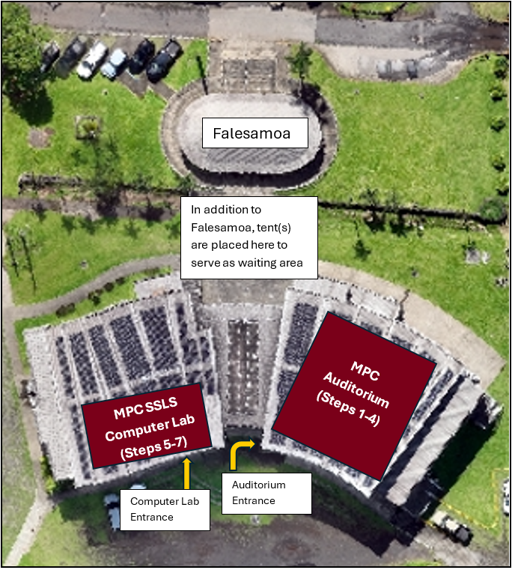
The ASCC in-person registration process for standard sessions begins in the MPC Auditorium (Steps 1-4) and ends in the MPC Computer Lab (Steps 5-7).
The first day of registration is reserved for New and Early Admission Students. For days 2 and 3, registration is open for all students, including New, Early Admission, Continuing, and Returning Students.
On Day 1, when students arrive, they should request a ticket from Security representative(s) stationed near the entrance before entering the MPC Auditorium for the New Student Orientation.
After the New Student Orientation is completed, the registration process begins. Students are asked to use the waiting area to await their ticket number to be called.
Once the student’s ticket number is called, he / she will enter the MPC Auditorium to complete steps 1-4 in the MPC Auditorium, and steps 5-7 in the MPC Computer Lab.
Day 1- Registration for New and Early Admission Students
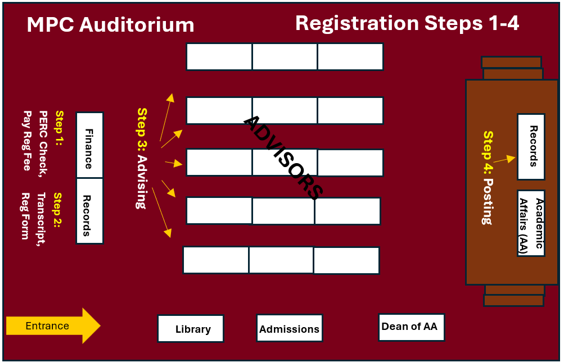
STEP 1 – PERC Check, Printed Transcript and Registration Form
- Check student PERC (holds)
- If student has Admissions hold, refer to Admissions representative located on the right side of the entrance area. Once hold is cleared by Admissions, student should return to Step 1.
- If Student has Library hold, student will be referred to the Library representative located on the right side of the entrance area. Once hold is cleared by Library, student should return to Step 1.
- If student has Business Office hold, cleared at Step 1 before student pays Registration Fee.
- Finance representative (Pay Registration Fee)
STEP 2 – Student is given printed transcript and registration form, then student moves on to next step
STEP 3 - Advising
- Advisors are stationed at tables in the center of the MPC. Locate your advisor depending on your major:
- If new student or undecided (no major declared), please locate Counseling or Counselors table
- CAPP students may also seek advising from CAPP Advisors
- o If you have declared a major, please locate the correct Department table
- If new student or undecided (no major declared), please locate Counseling or Counselors table
- See the next available advisor for advising
- If further advising or signature is needed from Dean of Academic Affairs, Dean is available on the right side of the entrance
- Make sure to sign your registration form
- Make sure your advisor signs your registration form
STEP 4 – Posting
- Give your signed registration form to Records Office representative located on stage
- Once your classes are posted, representative will keep your registration form and you will be directed to the next step
- If further advising or signature is needed from Dean of Academic Affairs, Dean is available on the right side of the entrance
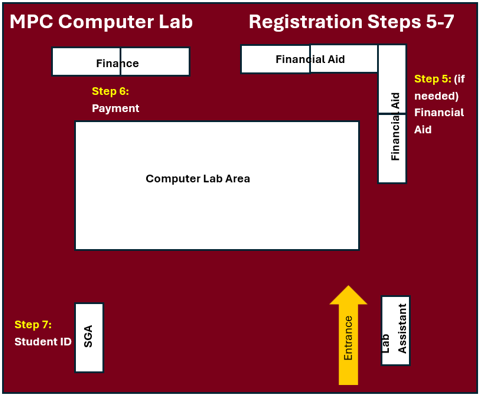
STEP 5 - Financial Aid Office – This step is only for students who are applying for or are seeking assistance from Financial Aid. Otherwise, skip this step.
- All Pell students are to be referred to the Financial Aid Office after posting in order for awards to be transmitted. During Registration, Financial Aid is located in MPC Computer Lab. If students have not completed their FAFSA online, Financial Aid representatives can assist them in the computer lab.
STEP 6 - Payment
- Go to Finance, located in MPC Computer Lab
- Pay for courses or set up payment arrangements for courses
- Pick up official class schedule
STEP 7 - ASCC Student ID
- Go to the Student Government Association office, located next to the Computer Lab Area
- Take picture for ASCC Student ID
- Pick up Student ID
At entrance, students will be directed as follows:
- IF a student has already registered during priority registration for the current term, then depending on the student's "need," he/she will be directed to the following office(s):
- ADD/DROP courses: Directed to Records (on stage) for schedule adjustments
- FINANCIAL AID: Directed to the assigned Financial Aid Counselor located in MPC Computer Lab
- PICK UP OFFICIAL SCHEDULE or to make payments: Directed to Finance representatives located in MPC Computer Lab.
- IF a student has not yest registered for the term, then direct student to Step 1 of Registration process, the steps are the same as Day 1.